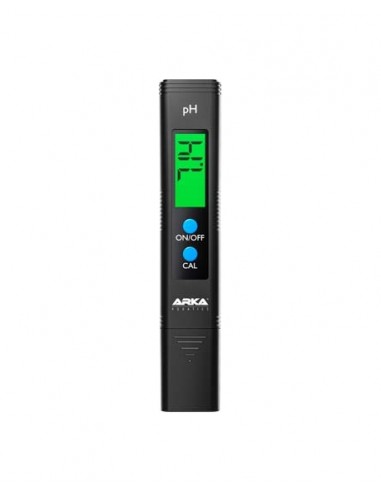
Myaqua Ph Meter Arka Arka Core - 1
search
  • Myaqua Ph Meter Arka Arka Core - 1

Myaqua Ph Meter Arka

€14.04
VAT included
Quantity
Last items in stock

  Garanties sécurité

(à modifier dans le module "Réassurance")

  Politique de livraison

(à modifier dans le module "Réassurance")

  Politique retours

(à modifier dans le module "Réassurance")

The myAqua pH meter by ARKA. The device quickly and reliably determines pH values in aquariums and pools and is suitable for both osmotic water and drinking water.

Technical Specifications:

Measurement Range 0.00 - 14.00 pH
Measurement Graduation 0.01 pH
Accuracy +/- 0.01 pH
Operating Temperature 0 - 60 °C
Weight 50 grams
Dimensions 155 x 30 x 18 mm

Operating Instructions:

  1. First, remove the protective cap from the pH meter.
  2. Rinse the electrode with distilled water and dry it thoroughly.
  3. Turn on the device outside the liquid to be measured. To do this, press the ON/OFF button.
  4. Immerse the electrode in the liquid to be measured. Ensure that the solution is not above the immersion line.
  5. Move the pH meter in the liquid to be measured and wait about 30 seconds for the reading to stabilize.
  6. Finally, rinse the electrode with distilled water. Then, dry it thoroughly.
  7. Turn off the device by pressing the ON/OFF button. Replace the protective cap. It ensures that the electrode does not dry out.

Calibration:

  1. Turn on the pH meter. Press the ON/OFF button for this.
  2. The delivery includes three calibration powders (4.00, 6.86 & 9.18). Choose the one whose pH is closest to the liquid you want to measure. Then, dissolve the powder in 250 ml of distilled water.
  3. Place the pH meter electrode in the prepared pH solution. Make sure the solution is not above the immersion line.
  4. Press the CAL button for 5 seconds. The value 6.86 should now appear and blink on the display.
  5. When using the 6.86 calibration solution, calibration is complete when the blinking stops.
  6. When using the 4.00 or 9.18 calibration solutions, you must (while the display is blinking) press the CAL button once for 4.00 or twice for 9.18. Calibration is complete when the blinking stops.
  7. Rinse the electrode with distilled water and dry it thoroughly.

You can check the measured pH values again. To do this, you need to immerse the measuring device in the pH solution and turn the device back on. The value should reappear on the screen. If not, you need to repeat the calibration as described above. After the entire process, the electrode should be rinsed again with distilled water and dried thoroughly.

Caution: The device is not waterproof!

Arka Core
PHM
1 Item

Specific References

EAN13
4062735741265
Comments (0)
No customer reviews for the moment.